


Download Adobe Stock – royalty‑free images, professional stock library, free trial
Overview
Adobe Stock is a cloud‑based marketplace that gives designers, marketers, and content creators instant access to millions of high‑quality, royalty‑free photos, illustrations, vectors, videos and 3D assets. The platform is tightly integrated with Adobe Creative Cloud, which means you can browse, license, and download assets without ever leaving Photoshop, InDesign, Illustrator, or Premiere Pro. For users who are just starting out, Adobe Stock offers a free tier that includes ten images per month, allowing you to test the quality and relevance of the collection before committing to a paid plan.
Every asset on Adobe Stock is vetted by professional photographers and graphic artists, ensuring consistent resolution, color accuracy, and composition standards. Because the images are royalty‑free, you can use them in commercial projects, presentations, websites, printed brochures, or even in client deliverables without worrying about attribution or recurring fees. The service also provides curated collections such as “Urban Life,” “Health & Wellness,” “Nature & Landscape,” and “Home & Lifestyle,” making it easy to find the perfect visual for any niche.
In addition to the vast library, Adobe Stock includes powerful search filters—orientation, color, people count, aspect ratio, and even “similar images”—so you can narrow down results in seconds. The platform’s licensing model is straightforward: a standard license covers most marketing and editorial uses, while an extended license unlocks unlimited print runs and merchandise sales. By leveraging Adobe Stock, creatives can dramatically reduce the time spent searching for the right visual, keep their projects on brand, and stay compliant with copyright law—all within a secure, Adobe‑backed ecosystem.
Core Features
- Massive Library: Over 200 million assets, including photos, vectors, videos, templates, and 3D models.
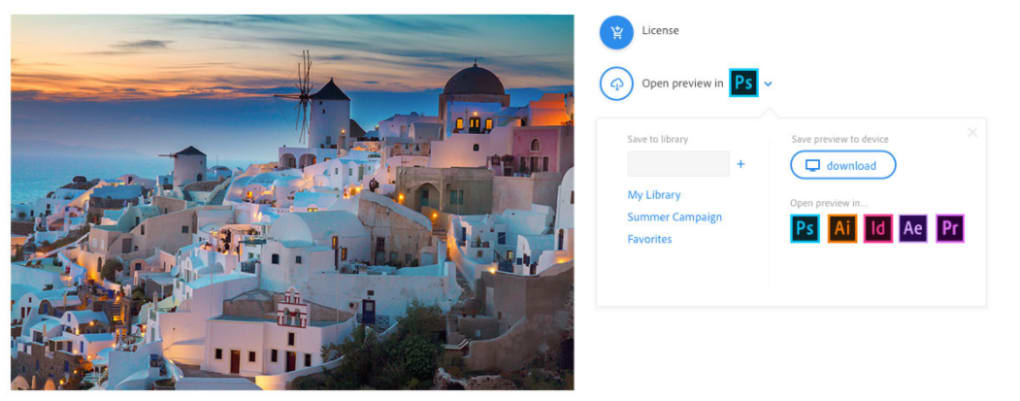
- Creative Cloud Integration: Directly search, preview, and license assets from Photoshop, Illustrator, InDesign, Premiere Pro and other Adobe apps.
- Free Trial Access: Ten royalty‑free images per month without a credit card, ideal for testing quality.
- Advanced Search Filters: Orientation, color, people count, aspect ratio, safe‑search, and “similar images” functionality.
- Curated Collections: Themed bundles such as “Urban Environments,” “Health & Wellness,” “Nature,” and “Home Life” for quick discovery.
- Flexible Licensing: Standard and extended licenses to cover marketing, editorial, merchandise, and unlimited print runs.
- Seamless Editing: Assets are ready for modification in Photoshop, Illustrator, InDesign, After Effects, and third‑party editors.
- Version History & Cloud Sync: Downloaded assets are stored in your Adobe Creative Cloud library for instant access across devices.
- Secure Payments & Billing: Credit card, PayPal, and Adobe subscription bundles with transparent pricing.
- Regular Updates: New assets added daily, ensuring fresh content for seasonal campaigns.
The feature set is designed to eliminate the friction that traditionally accompanies stock‑image sourcing. By embedding the search experience directly into Adobe’s flagship tools, users can maintain their creative flow without switching applications. The free tier is generous enough to let freelancers or small teams evaluate the service, while enterprise plans provide volume discounts and centralized billing. Moreover, the advanced filters and AI‑driven recommendations reduce the time spent scrolling through irrelevant results, allowing you to focus on design decisions that truly matter.
Installation, Usage & Compatibility
Adobe Stock is not a standalone executable; it operates as a cloud service accessed through Adobe’s desktop applications or via a web portal. To start using Adobe Stock, follow these steps:
- Create or sign in to an Adobe ID. A free Adobe account grants you immediate access to the ten‑image monthly credit.
- Launch a Creative Cloud app. In Photoshop, go to Window → Libraries → Adobe Stock to open the integrated panel.
- Search or browse. Use keywords, filters, or explore curated collections. Hover over a thumbnail to see licensing details.
- License and download. Click the “License” button; the asset instantly appears in your Creative Cloud library and can be dragged onto your canvas.
- Manage assets. All licensed files are stored in the Creative Cloud Files folder, accessible from any device logged into your Adobe account.
Adobe Stock works across the major operating systems supported by Creative Cloud:
- Windows 10 / 11 (64‑bit)
- macOS 12 Monterey and later
- iOS (iPad) via Adobe Photoshop for iPad
- Android tablets through Adobe Fresco (limited Stock integration)
Because the service is cloud‑based, you do not need to install additional plug‑ins or run background daemons. The only prerequisite is an active internet connection for searching and licensing assets. Once an asset is downloaded, you can work offline, and any edits are saved locally. For teams, Adobe offers an “Enterprise Library” that centralizes asset management, allowing administrators to set usage policies, control credit allocation, and monitor compliance across the organization. Updates are handled automatically by the Creative Cloud updater, ensuring you always have the latest search algorithms and security patches without manual intervention.
Pros, Cons & Frequently Asked Questions
Pros
- Unmatched library size and quality – professional‑grade assets for any project.
- Deep integration with Adobe Creative Cloud reduces workflow interruptions.
- Free monthly credit lets new users test the service without financial commitment.
- Flexible licensing options cover both small‑scale marketing and large‑scale merchandise.
- AI‑enhanced search and “similar images” save time and improve relevance.
Cons
- Pricing can be higher than some budget stock sites for heavy users.
- Full feature set requires a Creative Cloud subscription, which may not suit non‑Adobe users.
- Internet dependency for browsing and licensing may be limiting in low‑bandwidth environments.
- Extended license costs are steep for occasional large‑print projects.
- Limited offline search capability – you must be online to discover new assets.
FAQ
How many free images can I download from Adobe Stock each month?
Adobe Stock offers ten royalty‑free images per month for free, without requiring a credit card. These credits reset each month as long as you maintain an active Adobe ID.
Do I need an Adobe Creative Cloud subscription to use Adobe Stock?
A Creative Cloud subscription is not mandatory for the free tier, but many advanced features (like direct panel integration and unlimited cloud sync) require an active Creative Cloud plan.
Can I edit Adobe Stock images in non‑Adobe applications?
Yes. All downloaded assets are standard file formats (JPEG, PNG, EPS, MP4, etc.) that can be opened and edited in third‑party editors such as GIMP, Affinity Photo, or DaVinci Resolve.
What is the difference between a Standard and an Extended license?
A Standard license covers most marketing, editorial, and digital uses, up to 500,000 copies. An Extended license removes those limits, allowing unlimited prints, merchandise, and resale of the asset.
How are my downloaded assets stored and accessed later?
Licensed assets are automatically saved to your Adobe Creative Cloud library. You can access them from any device logged into your Adobe ID, or download them directly from the web portal for offline use.
Conclusion & Call to Action
Adobe Stock stands out as the most comprehensive, professionally curated stock library available to creatives today. Its seamless integration with Photoshop, Illustrator, InDesign, and Premiere Pro means you can locate, license, and apply high‑quality visuals without ever leaving your primary design environment. While the pricing model may be a consideration for occasional users, the free monthly credit and the reliability of royalty‑free licensing make it a low‑risk investment for freelancers, agencies, and enterprises alike. The platform’s AI‑driven search, robust filter options, and constantly refreshed content ensure that you’ll always find a fresh visual that matches your brand’s voice. If you’re already embedded in the Adobe ecosystem, Adobe Stock is the logical next step to accelerate your workflow, keep your projects on‑brand, and avoid the legal headaches associated with unlicensed imagery.
Ready to elevate your creative projects? Click the button below to download Adobe Stock, claim your ten free images, and explore the full library with a risk‑free trial. Experience the power of professional stock imagery today.
Download Adobe Stock Now


.png)



